10 July 2012

AA Gold member benefits, the real cost

Breakdown cover maths

So, I'm getting rather fed up with the AA taking the michael every year with their renewals. Yes, I gather the RAC are just as bad but I think they need to realise their customers aren't stupid, know exactly what they are playing at, and can do the maths.

I want to highlight what I think is a particularly dirty trick, making something look like a free perk when it's anything but.

So here's some numbers:

This is for a single car policy covering Roadside, Home Start and Relay starting July 2012 paying annually for a year up front. (The monthly option is 10% more expensive, go figure). Numbers rounded to pounds.


  • Renewal through the post: £135
  • Matching RAC cover (checked online & by phone): £101
  • AA online price for new customers: £92  - (so much for 6 years loyalty, a £43 kick in the teeth)
  • AA phone price: £116
  • AA phone price without gold membership "benefits": £89


That means, the AA are pricing their gold benefits at £27 even though they look like they are free on the renewal letter! Some cheek.


I queried the details of this so called benefit and established the following:
  • "Accident Management" - means being towed by the AA after an accident (something you may be covered for under your car insurance policy)
  • European Breakdown Cover - only useful if you are going abroad (obviously), did you really want to be paying for it?
  • "Family Associates Cover for under 17s" - something about teenagers, I don't have any so not very useful to me
  • Key Insurance - this could be valuable, but £27/year sounds like very expensive insurance to me even though they are expensive items to replace.
  • Legal Advice - Included as standard! So not a gold benefit at all. Weasels.
  • Technical Advice - Included as standard! See above. Still weasels.

So it turns out that the supposed discount of £44.90 on the posted renewal was actually a £46 insult to my intelligence.


I'm no money saving expert, but that's outrageous.

Configuration confusion in visual studio

Here's a gotcha that got me.

It is not immediately obvious, but visual studio stores in it's sln file a set of project configuration selections for every combination of solution configuration and solution platform.


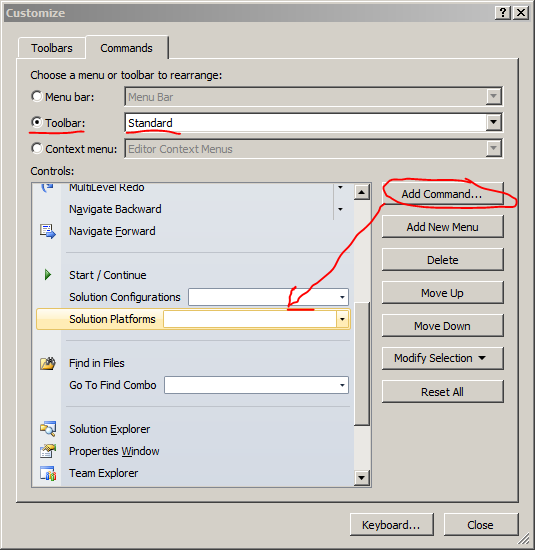
The gotcha is that by default Visual Studio (all versions 2008-2012 as far as I know) only show one half of that combination in the standard toolbar, so you can get in a situation where one of your developers is building something completely different to everyone else as somehow the platform has silently been changed.

I recommend you add Platform to your toolbar so that you can always see what you are about to build.


And if possible, remove any unused platform configurations from your solution entirely.

14 June 2012

automatic mysql backups

On a debian server with mediawiki installed and running with a local mysql.

root@myserver:~# apt-get install automysqlbackup

root@myserver:~# crontab -e

# m  h  dom mon dow   command
  5  4  *   *   *     automysqlbackup


root@myserver:~# automysqlbackup
root@myserver:~# cd /var/lib/automysqlbackup/
root@myserver:/var/lib/automysqlbackup# find .
.
./weekly
./weekly/wikidb
./weekly/information_schema
./daily
./daily/wikidb
./daily/wikidb/wikidb_2012-06-14_16h03m.Thursday.sql.gz
./daily/information_schema
./daily/information_schema/information_schema_2012-06-14_16h03m.Thursday.sql.gz
./monthly


Result! No longer need to write a custom cron script each time.


Project homepage: http://sourceforge.net/projects/automysqlbackup/

11 June 2012

Connecting to smb shares on a domain in gnome

The domain name has to be UPPERCASE otherwise authentication fails.

Majorly confusing.

Time lost: 3 hours.


Sigh

22 May 2012

Debugging stored procedures in VS2010 / SQL Express


Debugging stored procs in a local SQL Express install with Visual Studio 2010.


In Visual Studio, Server Explorer, Connect to your server as localhost instead of .\SQLEXPRESS so that you connect through TCP/IP and not shared memory (which doesn't allow debugging for some reason)

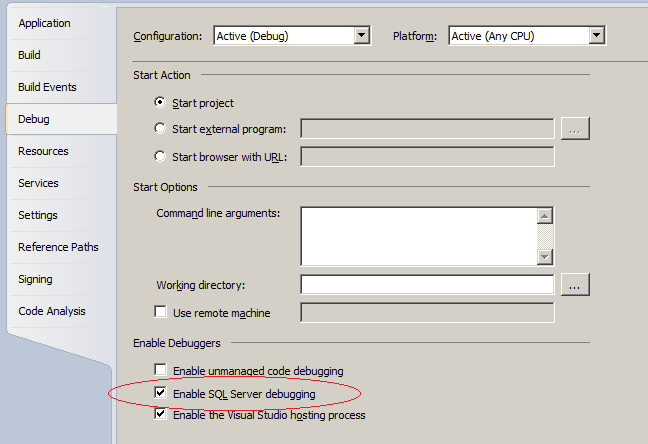
Find the project in your solution which actually executes the stored procedure, right-click > properties > debug > "Enable SQL Server debugging"

Run your project

You may need to hit "stop" and re-attached (debug > attach to process) explicitly selecting "T-SQL code" in the "attach to" box (and optionally managed as well). It *should* automatically select T-SQL but it seems to be hit and miss.

Set a breakpoint in your stored procedure:
  • Server explorer, 
  • the connection you added,
  • stored procs,
  • right-click the proc name > open
  • set a break point in the text of the stored proc
    • if it is not a solid red dot then something went wrong
Run the part of your program / website that will cause the proc to be called.

If the breakpoint isn't hit check the type's in the attach to process list include T-SQL (doesn't seem to always work).

I only got the damn thing to work once. If it doesn't work you get no reason at all which is just crap. The main problem I have is that the attach just quietly drops T-SQL even if you explicitly request it. Shoddy coding from Microsoft in my opinion.

The next best thing is to right-click the stored proc, click "step into" and input the values manually. (Which also requires a tcp/ip connection to the local sql express and is fussy).

Another message encountered a couple of days later without changing anything at all when attaching to the already running web dev process: "User Could Not Execute Stored Procedure sp_enable_sql_debug"


Enabling TCP/IP in SQL Express 2008 R2

Programs > .. R2 > SQL Server Configuration Manager
Network config > Protocols > tcp/ip > enable & properties


Clear the dynamic port under IPAll
Set the TCP Port to 1433 (which is the standard sql server port).

You can then connect to "localhost" (with no instance specified) in management studio.

refs:

18 April 2012

Running IE Application Compatibility VPC under Virtual Box

This post is no longer necessary as microsoft now provide official virtualbox images, yay!
http://www.modern.ie/en-us/virtualization-tools#downloads

----
Microsoft provide Virtual PC images for testing your website with IE. You can download them from http://www.microsoft.com/download/en/details.aspx?id=11575

Note that the XP image has no expired so is no use, it will reboot immediately after login.

I wanted to make use of the Win 7 / IE 9 image, however Virtual PC is unavailable on Linux. Fortunately VirtualBox can mount Virtual PC's disk images.

For me the image would get half way through booting windows, and then blue-screen (BSOD). I discovered that it was possible to get past this by removing the SATA controller the machine's settings, and instead adding the disk under the IDE controller. After that the machine booted successfully.


Capturing the BSOD, basically press F8 after a lot rebooting, and select "disable automatic restart on system failure" (ref: http://www.webtlk.com/2009/07/02/how-to-stop-windows-7-reboot-loop/)


And here's the bluescreen: